
Introduction
Every modern software application depends on a database to store, organize, and retrieve information. Whether it’s an e-commerce website, banking system, hospital management application, or social media platform, a well-designed database ensures data remains accurate, organized, and easily accessible as the application grows.
Think of a library where books are placed randomly without categories or labels. Finding a specific book would be difficult and time-consuming. By organizing books by genre, author, and title, the library becomes efficient and easy to use. Database design follows the same principle by structuring data so applications can manage it efficiently.
Many beginner developers focus on programming languages and frameworks while overlooking database design. However, a poorly designed database can lead to slow performance, duplicate records, inconsistent data, and applications that become difficult to maintain. A strong understanding of database design helps developers build scalable, reliable, and maintainable software systems.
In this article, you’ll learn the fundamentals of database design, understand its importance, explore its core components, and discover the best practices for designing databases used in real-world applications.
What is Database Design?
Database design is the process of organizing data into a structured format so it can be stored, managed, and retrieved efficiently. It involves identifying what information an application needs, how different pieces of data are related, and how they should be organized to maintain accuracy while avoiding unnecessary duplication.
Rather than storing everything in a single table, a well-designed database separates information into logical entities. For example, a Student Management System stores different types of information in separate tables, making the database organized, scalable, and easier to maintain.
Example: Student Management System
- ➜ Students
- ➜ Courses
- ➜ Teachers
- ➜ Enrollments
- ➜ Attendance
- ➜ Fees
Each table stores only the information related to that specific entity while maintaining relationships with other tables. This structure improves data organization, simplifies maintenance, and makes it easier to retrieve information and generate reports.
Stages of Database Design
- Logical Database Design – Defines the entities, attributes, relationships, and business rules based on the application’s requirements.
- Physical Database Design – Implements the logical design using a Database Management System (DBMS) by selecting data types, defining keys, creating indexes, and optimizing storage.
Database design is the blueprint of a database. A well-planned design ensures that applications remain scalable, reliable, and easy to maintain as data continues to grow.
Think of database design as creating a blueprint before constructing a building. Just as architects carefully plan a structure before construction begins, developers should design the database before writing application code. A well-planned database forms the foundation of scalable, reliable, and maintainable software applications.
Why Database Design Matters
A well-designed database is the foundation of every successful software application. It ensures that data is organized, accurate, and easy to manage while supporting the application’s performance and future growth. Whether you’re building a small business application or a large enterprise system, proper database design helps reduce development effort and improves long-term reliability.
Key Benefits of Good Database Design
- Efficient Data Organization – Stores information in a structured format for faster retrieval and updates.
- Data Consistency – Minimizes duplicate and conflicting records by organizing related data effectively.
- Scalability – Supports business growth without requiring major database redesign.
- Easy Maintenance – Makes the database easier to understand, update, and extend.
- Data Integrity – Uses primary keys, foreign keys, and constraints to maintain accurate and reliable information.
Investing time in database design during the planning stage creates a strong foundation for building scalable, maintainable, and high-performing software applications.
A well-planned database not only improves application performance but also simplifies future development. As business requirements evolve, a properly designed database allows developers to introduce new features, manage larger volumes of data, and maintain system reliability without extensive redesign.
Types of Databases
Databases can be broadly categorized into two major types: Relational Databases (SQL) and Non-Relational Databases (NoSQL). Each serves different purposes depending on the application’s requirements.
Relational Databases (SQL)
Relational databases organize information into tables consisting of rows and columns. These tables are connected using relationships, making it easy to retrieve related information while maintaining data consistency.
Popular Relational Database Systems
- MySQL
- PostgreSQL
- Microsoft SQL Server
- Oracle Database
Relational databases use Structured Query Language (SQL) to create, retrieve, update, and delete data. They are widely used in banking systems, school management systems, ERP solutions, accounting software, and e-commerce platforms where data accuracy and consistency are critical.
Non-Relational Databases (NoSQL)
NoSQL databases store information in formats other than traditional tables, such as documents, key-value pairs, graphs, or wide-column structures. They are designed to manage large volumes of rapidly changing or unstructured data.
Popular NoSQL Databases
- MongoDB
- Redis
- Apache Cassandra
- Couchbase
These databases are commonly used for social media platforms, real-time analytics, chat applications, IoT systems, and large-scale web services where flexibility and high scalability are more important than complex relationships.
| Relational Database (SQL) | NoSQL Database |
|---|---|
| Stores data in tables | Stores data as documents, key-value pairs, graphs, or columns |
| Uses SQL language | Uses database-specific query methods |
| Best for structured data | Best for semi-structured or unstructured data |
| Supports complex relationships | Flexible schema with fewer relationships |
| Excellent data consistency | Excellent scalability and flexibility |
For beginners, learning Relational Databases (SQL) is highly recommended because they provide a strong foundation for understanding tables, relationships, keys, and normalization. Once these fundamentals are mastered, exploring NoSQL databases becomes much easier.
Core Components of a Database
Every relational database consists of a few essential components that work together to store, organize, and retrieve data efficiently.
| Component | Description |
|---|---|
| Table | Stores related information about a specific entity, such as Students, Courses, or Teachers. |
| Row (Record) | Represents a single record within a table. |
| Column (Field) | Defines a specific attribute of the data, such as Student_Name or Email. |
| Primary Key (PK) | Uniquely identifies each record in a table. Example: Student_ID. |
| Foreign Key (FK) | Connects two tables by referencing the primary key of another table. |
| Index | Improves data retrieval speed by allowing faster searches. |
| Constraints | Rules that maintain data integrity, such as NOT NULL, UNIQUE, PRIMARY KEY, FOREIGN KEY, and CHECK. |
Together, these components form the foundation of every well-designed relational database, ensuring data remains organized, accurate, and easy to retrieve.
Understanding Database Relationships
Real-world data is interconnected, and databases use relationships to represent these connections efficiently. Instead of storing duplicate information, relationships allow multiple tables to share related data while maintaining consistency and reducing redundancy.
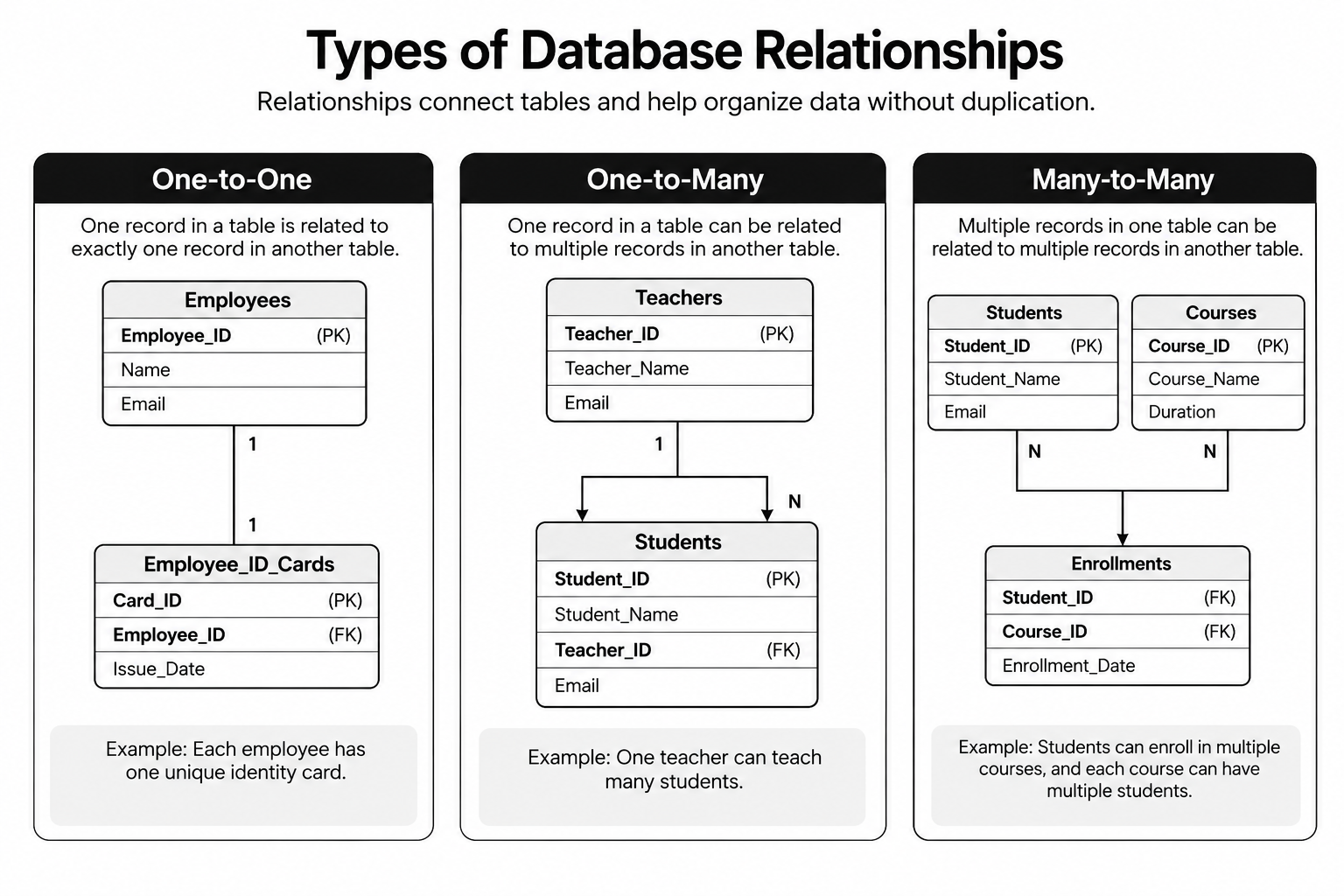
Figure: Example of relationships between database tables.
Database relationships eliminate duplicate data and ensure that related information remains accurate, consistent, and easy to manage.
The Database Design Process
Designing a database involves much more than creating tables. A structured process helps developers build databases that are organized, scalable, and easy to maintain. Before implementation, it is important to understand what data needs to be stored and how different entities are related.
| Step | Process | Description |
|---|---|---|
| 1 | Gather Requirements | Understand the application’s purpose, required data, users, reports, and business requirements. |
| 2 | Identify Entities | Identify the main entities (Students, Teachers, Courses, Departments, Enrollments, Fees). Each entity usually becomes a separate database table. |
| 3 | Define Attributes | Determine which fields each entity requires, such as Student_ID, Student_Name, Email, and Date_of_Birth. |
| 4 | Define Relationships | Connect related tables using Primary Keys and Foreign Keys to represent real-world relationships. |
| 5 | Review & Refine | Review the design, remove duplicate data, verify relationships, and ensure the database is efficient before implementation. |
A successful database starts with a solid design. Following these five steps helps create databases that are organized, scalable, reliable, and easy to maintain.
Common Database Design Mistakes
Many database-related problems arise because of poor planning rather than technical limitations. Beginners often make mistakes that affect both application performance and data quality.
| # | Common Mistake | Why It’s a Problem |
|---|---|---|
| 1 | Storing Everything in One Table | Creates duplicate data, makes updates difficult, and reduces query performance. |
| 2 | Not Using Primary Keys | Makes it difficult to uniquely identify records and increases the risk of duplicate data. |
| 3 | Ignoring Relationships | Prevents proper linking between tables, resulting in inconsistent and duplicated information. |
| 4 | Choosing Incorrect Data Types | Wastes storage space and makes searching, sorting, and filtering less efficient. |
| 5 | Poor Naming Conventions |
Generic names like Table1 or ColumnA reduce readability. Use descriptive names such as Students, Courses, Student_ID, and Course_Name.
|
Avoiding these common mistakes helps build databases that are efficient, reliable, maintainable, and ready to scale as applications grow.
Database Design Best Practices
Designing a database is not just about storing data—it is about creating a structure that remains reliable, efficient, and easy to maintain as the application grows. Following industry best practices helps developers avoid common problems and build databases that support long-term business needs.
Essential Database Design Best Practices
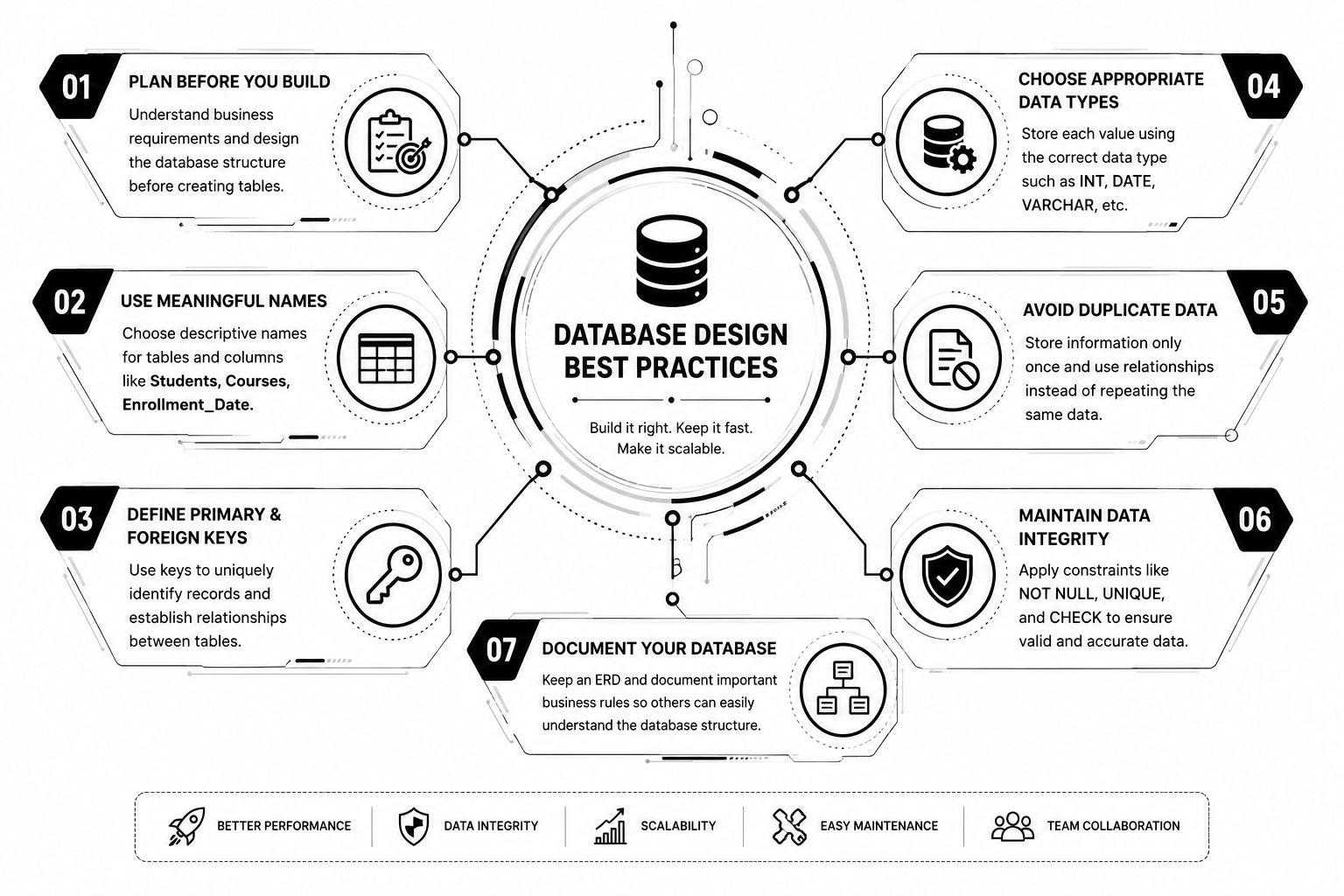
Following these best practices helps create databases that are organized, efficient, maintainable, and scalable, reducing future development effort while supporting long-term business growth.
Real-World Example: Student Management System
Consider a Student Management System used by a training institute or college.
Instead of storing all information in a single table, the database is divided into multiple related tables:
| Table | Purpose |
|---|---|
| Students | Stores student information. |
| Teachers | Stores teacher details. |
| Courses | Stores available courses. |
| Enrollments | Connects students with courses. |
| Attendance | Tracks daily attendance. |
| Fees | Maintains fee payment records. |
Benefits of This Structure
- ➜ Student information is stored only once.
- ➜ Courses can have multiple students.
- ➜ Students can enroll in multiple courses.
- ➜ Reports become easier to generate.
- ➜ The database remains organized as the institute grows.
This structured approach demonstrates how proper database design simplifies application development and improves data management.
Key Takeaways
Before designing any database, remember these important principles:
- ➜ Database design is the foundation of every software application.
- ➜ Organize data into logical tables based on business requirements.
- ➜ Use primary keys to uniquely identify records.
- ➜ Use foreign keys to establish relationships between tables.
- ➜ Select appropriate data types for every column.
- ➜ Avoid duplicate data by organizing information properly.
- ➜ Follow consistent naming conventions.
- ➜ Plan the database carefully before implementation.
These principles help create databases that are reliable, scalable, efficient, and easier to maintain throughout the application’s lifecycle.
Conclusion
A well-designed database is the foundation of every successful software application, ensuring data remains accurate, organized, and easily accessible while improving performance, reducing maintenance, and supporting future growth. As a software developer, mastering database design is just as important as learning programming, system design, and software architecture because it enables you to build scalable, reliable, and maintainable applications.
A strong database design doesn’t just store data—it creates a solid foundation for building high-performance, scalable, and future-ready software systems.