Introduction
Every successful software application is built using a carefully selected combination of technologies known as a technology stack. It includes the frontend, backend, database, cloud services, and other tools that work together to build, deploy, and maintain an application.
Choosing the right technology stack is one of the most important decisions in software development. A well-planned stack improves development speed, performance, security, maintainability, and future scalability, while the wrong choice can increase complexity, costs, and maintenance efforts.
A common misconception is that there is one “best” technology. In reality, every programming language, framework, and database has its own strengths and is suited for different types of projects. The right choice depends on factors such as project requirements, budget, expected users, development timeline, and team expertise.
In this article, you’ll learn the core components of a technology stack, explore popular technologies, and discover how to choose the best stack for your software project.
What is a Technology Stack?
A technology stack is the combination of technologies, frameworks, programming languages, databases, and tools used to build and run a software application. Instead of relying on a single technology, modern applications use multiple components, each responsible for a specific part of the system.
Think of a technology stack like building a house. Just as a house needs bricks, cement, steel, plumbing, and electrical wiring, a software application needs different technologies working together to function efficiently.
For example, in an online shopping website, the frontend displays products, the backend processes orders, the database stores customer information, APIs connect different services, authentication secures user accounts, hosting makes the application available online, DevOps automates deployment, and monitoring keeps the system healthy.
Components of a Modern Technology Stack
| Component | Purpose | Popular Technologies |
|---|---|---|
| Frontend | User interface and user experience | HTML, CSS, JavaScript, React, Vue, Angular, Nuxt, Next.js |
| Backend | Business logic and server-side processing | Laravel, Node.js, Django, FastAPI, Spring Boot, .NET |
| Database | Stores and manages application data | MySQL, PostgreSQL, MongoDB, SQL Server, Redis |
| API | Connects different applications and services | REST, GraphQL, gRPC |
| Authentication | Verifies user identity and secures access | JWT, OAuth 2.0, SSO, MFA |
| Hosting & Cloud | Deploys and runs the application online | Shared Hosting, VPS, AWS, Azure, Google Cloud |
| DevOps | Automates building, testing, and deployment | Docker, GitHub Actions, GitLab CI/CD, Jenkins, Kubernetes |
| Monitoring | Tracks application performance and errors | Grafana, Prometheus, Sentry, New Relic, Datadog |
Together, these components form a complete technology stack that enables developers to build secure, scalable, and maintainable software applications.
How These Components Work Together
Although each component has a different responsibility, they work together to deliver a complete software solution. When a user opens a website, the frontend sends a request to the backend through an API. The backend processes the request, retrieves or updates data in the database, verifies user authentication if required, and returns the appropriate response. The application runs on hosting infrastructure, while DevOps tools manage deployments and monitoring systems continuously track performance and reliability.
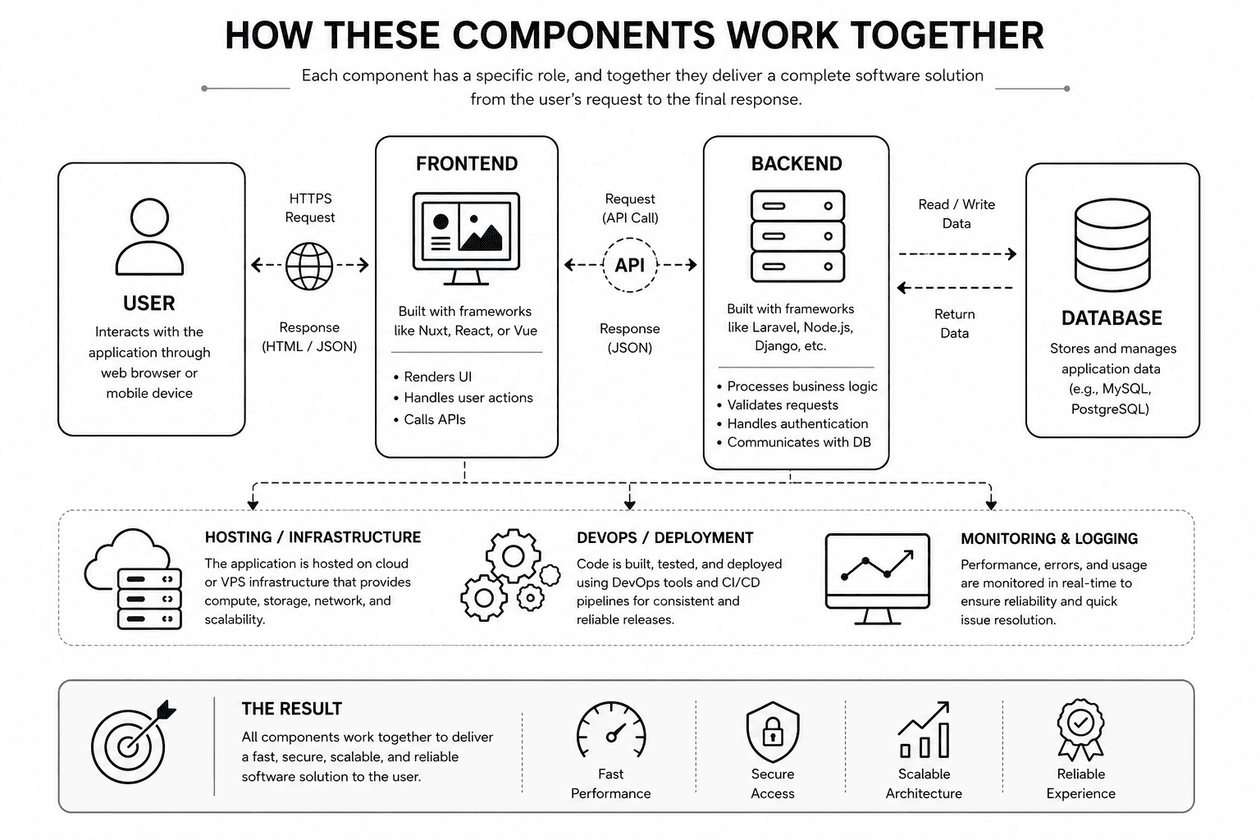
Understanding these components is the first step toward selecting the right technology stack. Rather than choosing technologies based on popularity, successful software projects combine tools that best match the project’s goals, budget, scalability requirements, and the development team’s expertise.
Frontend Technologies
The frontend is the part of a software application that users see and interact with. It includes everything from buttons, forms, and navigation menus to dashboards and animations. Modern frontend development combines core web technologies with powerful frameworks to create fast, responsive, and user-friendly applications.
The following table summarizes the most popular frontend technologies and when they are commonly used.
| Technology | Purpose | Best For | Key Strengths |
|---|---|---|---|
| HTML | Defines the structure and content of web pages. | Static websites, blogs, landing pages, portfolios | Easy to learn, supported by all browsers, foundation of every website |
| CSS | Controls the visual design and layout of websites. | Responsive layouts, themes, animations | Attractive UI, responsive design, better user experience |
| JavaScript | Adds interactivity and dynamic behavior to web pages. | Forms, dashboards, real-time updates, interactive websites | Runs in the browser, large ecosystem, essential for modern web apps |
| React | JavaScript library for building reusable user interfaces. | Single Page Applications (SPAs), dashboards, enterprise apps | Component-based architecture, high performance, huge community |
| Vue.js | Progressive JavaScript framework focused on simplicity and flexibility. | Business applications, admin panels, SaaS products | Easy to learn, lightweight, clean syntax |
| Angular | Complete frontend framework developed by Google. | Enterprise software, banking systems, large-scale applications | TypeScript support, scalable architecture, built-in features |
| Nuxt | Framework built on Vue.js with SSR and SEO capabilities. | Company websites, blogs, educational platforms, SaaS | Excellent SEO, faster page loading, automatic routing |
| Next.js | React framework with SSR, SSG, and full-stack capabilities. | E-commerce, enterprise portals, content-driven websites | High performance, SEO-friendly, built-in routing |
Which One Should You Choose?
- ➜ HTML + CSS + JavaScript – Every web developer should master these fundamentals.
- ➜ React – Ideal for interactive and large-scale web applications.
- ➜ Vue.js – A great choice for beginners and business applications.
- ➜ Angular – Best suited for enterprise-level projects with large development teams.
- ➜ Nuxt – Perfect for Vue-based projects that require SEO and high performance.
- ➜ Next.js – Excellent for React projects focused on speed, scalability, and search engine optimization.
The best frontend technology depends on your project’s requirements, your team’s expertise, and long-term maintenance goals. There is no single framework that is perfect for every application—successful developers choose the tool that best fits the problem they are solving.
Which Frontend Technology Should You Choose?
There is no single frontend technology that is perfect for every project. The right choice depends on the project’s requirements, complexity, development timeline, and the experience of your team.
| Technology | Best For |
|---|---|
 HTML HTML |
Static websites and content structure |
 CSS CSS |
Styling, responsive layouts, and visual design |
 JavaScript JavaScript |
Interactive web pages and browser functionality |
 React React |
Large interactive web applications and dashboards |
 Vue.js Vue.js |
Business applications, admin panels, and beginner-friendly development |
 Angular Angular |
Enterprise-scale and complex corporate applications |
 Nuxt Nuxt |
SEO-friendly Vue applications, business websites, and SaaS platforms |
 Next.js Next.js |
High-performance React applications, e-commerce, and content-driven websites |
The most successful frontend developers don’t choose technologies based on popularity alone. Instead, they evaluate project requirements, scalability, performance, SEO needs, and long-term maintenance before deciding on a frontend technology. By selecting the right tool for the right job, teams can build applications that are easier to develop, maintain, and grow over time.
Backend Technologies
The backend is the server-side component of an application that processes requests, executes business logic, communicates with databases, manages authentication, and returns data to the frontend. Whenever a user logs in, places an order, submits a form, or retrieves information, the backend performs the necessary operations behind the scenes.
Different backend technologies are designed for different types of applications. Rather than searching for the “best” backend framework, it’s more important to choose one that aligns with your project’s requirements, scalability goals, and your team’s expertise.
| Technology | Description | Best For | Key Strengths |
|---|---|---|---|
 PHP (Laravel) |
Modern PHP framework for building secure and scalable web applications. | Business applications, CRM, ERP, CMS, educational portals, e-commerce, REST APIs | Rapid development, built-in authentication, strong security, excellent documentation, and a large community. |
 Node.js |
JavaScript runtime that enables server-side development with asynchronous processing. | Real-time applications, chat systems, streaming platforms, APIs, and microservices | High performance, non-blocking architecture, JavaScript across the full stack, and a massive npm ecosystem. |
 Python (Django / FastAPI) |
Python frameworks focused on productivity, APIs, automation, and AI-driven applications. | AI & Machine Learning, automation, data analytics, REST APIs, and startups | Clean syntax, rapid development, powerful AI ecosystem, and excellent API support. |
 Java (Spring Boot) |
Enterprise-grade Java framework for building secure and highly scalable applications. | Banking, insurance, ERP, government systems, and enterprise software | Excellent scalability, reliability, mature ecosystem, and long-term maintainability. |
 C# (.NET) |
Microsoft’s cross-platform framework for web, desktop, cloud, and enterprise applications. | Enterprise software, healthcare, finance, desktop applications, and cloud services | High performance, strong security, Microsoft ecosystem integration, and cross-platform support. |
Choosing the Right Backend
Each backend technology has its own strengths, and the right choice depends on the project’s objectives rather than popularity. Understanding where each technology performs best helps developers make informed decisions and build applications that are easier to maintain and scale.
- Laravel is an excellent choice for business applications and rapid web development.
- Node.js is ideal for real-time communication and high-concurrency applications.
- Python (Django/FastAPI) is well suited for AI, automation, data-driven systems, and modern APIs.
- Spring Boot is commonly used for large enterprise systems that demand reliability and scalability.
- .NET is a strong option for organizations building enterprise solutions, especially within the Microsoft ecosystem.
The most successful backend isn’t defined by the programming language—it is defined by how effectively it meets business requirements, supports future growth, remains secure, and is easy for the development team to maintain.
Which Backend Technology Should You Choose?
Each backend technology has its own strengths, ecosystem, and ideal use cases. The right choice depends on factors such as project requirements, expected traffic, scalability goals, available development skills, and long-term maintenance plans.
| Technology | Common Use Cases |
|---|---|
|
PHP (Laravel) |
Business applications, CMS, educational portals, e-commerce, and REST APIs. |
|
Node.js |
Real-time applications, chat systems, streaming platforms, APIs, and microservices. |
|
Python (Django / FastAPI) |
AI, machine learning, automation, data analytics, and modern APIs. |
|
Java (Spring Boot) |
Enterprise software, banking, government systems, and large-scale business platforms. |
|
C# (.NET) |
Enterprise applications, healthcare, finance, desktop software, and cloud services. |
Rather than following industry trends, successful development teams evaluate the project’s objectives before selecting a backend technology. Factors such as performance requirements, security, development speed, scalability, deployment environment, and team experience all play an important role in making the right decision.
A strong backend is not defined by the programming language it uses—it is defined by how effectively it solves business problems, supports future growth, maintains security, and delivers reliable performance throughout the application’s lifecycle.
Choosing the Right Database
A database stores and manages the information your application relies on, such as users, products, orders, attendance, invoices, and reports. Choosing the right database directly affects your application’s performance, scalability, reliability, and long-term maintenance.
Databases are broadly classified into SQL (Relational) and NoSQL (Non-Relational) databases. Each serves different purposes depending on the application’s data structure and workload.
SQL vs NoSQL
| SQL Databases | NoSQL Databases |
|---|---|
| Store data in structured tables. | Store data as documents, key-value pairs, graphs, or other flexible formats. |
| Fixed schema with defined relationships. | Flexible schema that adapts to changing data. |
| Best for transactional systems. | Best for rapidly changing or high-volume data. |
| Strong consistency and complex queries. | High scalability and flexibility. |
| Examples: MySQL, PostgreSQL | Examples: MongoDB, Redis |
Learn More: If you’d like to understand database tables, relationships, normalization, and schema design, read our Database Design Fundamentals: A Beginner’s Guide to Building Better Databases.
Popular Databases
| Database | Type | Best For | Key Strengths |
|---|---|---|---|
 MySQL |
SQL | Business applications, CMS, e-commerce, educational portals | Reliable, easy to learn, excellent transactional performance, and broad framework support. |
 PostgreSQL |
SQL | Enterprise software, SaaS, finance, analytics | Advanced SQL features, high scalability, and strong data integrity. |
 MongoDB |
NoSQL | Content platforms, IoT, social media, rapidly evolving applications | Flexible document storage, schema-less design, and horizontal scalability. |
 Redis |
In-Memory NoSQL | Caching, sessions, queues, real-time analytics | Extremely fast, reduces database load, and improves application performance. |
Which Database Should You Choose?
| Requirement | Recommended Database |
|---|---|
| Business Management System | MySQL |
| E-commerce Website | MySQL or PostgreSQL |
| Enterprise ERP or Banking | PostgreSQL |
| SaaS Application | PostgreSQL |
| Blog or CMS with Flexible Content | MongoDB |
| IoT or High-Volume Data | MongoDB |
| Session Storage & Caching | Redis |
| Real-Time Dashboards | Redis |
Real-World Example
Modern applications often use multiple databases together. For example, an e-commerce platform may store customers, products, and orders in MySQL or PostgreSQL, while Redis caches frequently accessed data such as product listings and user sessions to improve performance. This combination allows applications to balance reliability, scalability, and speed.
The best database isn’t the most popular one—it’s the one that best fits your application’s data structure, performance requirements, scalability goals, and long-term maintenance strategy.
Cloud & Hosting Options
Once your application is ready, it needs an environment where users can access it. This is known as hosting or cloud infrastructure. The right hosting solution directly impacts your application’s performance, scalability, security, availability, and operational cost.
The best hosting option depends on your application’s size, expected traffic, budget, and future growth. Different hosting models are designed to meet different business and technical requirements.
Hosting Options
| Hosting Type | Description | Best For | Key Benefits |
|---|---|---|---|
| Shared Hosting | Multiple websites share the same server and resources. | Blogs, portfolios, personal websites, and small business websites | Low cost, easy setup, and minimal maintenance. |
| VPS (Virtual Private Server) | Dedicated virtual resources with full server control. | Business websites, ERP, CRM, educational portals, and growing applications | Better performance, improved security, flexibility, and server customization. |
| Cloud Hosting | Uses multiple servers to provide scalable and highly available infrastructure. | SaaS products, enterprise applications, and high-traffic websites | Auto scaling, high availability, and pay-as-you-use pricing. |
|
Containers (Docker) |
Packages applications and their dependencies into portable containers for consistent deployment. | DevOps, CI/CD, microservices, and cloud-native applications | Easy deployment, portability, and consistency across environments. |
Popular Cloud Platforms
| Platform | Popular Services | Ideal For |
|---|---|---|
 Amazon Web Services (AWS) |
EC2, RDS, S3, Lambda | Startups, enterprise systems, and globally scalable applications |
 Microsoft Azure |
Virtual Machines, Azure SQL, App Service, Storage | Organizations using Microsoft technologies and enterprise workloads |
 Google Cloud Platform (GCP) |
Compute Engine, Cloud SQL, Cloud Storage, GKE | AI, machine learning, analytics, Kubernetes, and cloud-native applications |
 Docker |
Containerization platform (not a cloud provider) | Portable deployments, DevOps, CI/CD pipelines, and microservices |
Note: Docker is commonly used alongside AWS, Microsoft Azure, or Google Cloud Platform to ensure applications run consistently across development, testing, and production environments.
Choosing the right hosting environment is just as important as choosing the right technology stack. A reliable cloud platform provides the scalability, security, and availability required to keep your application running smoothly as your users and business continue to grow.
Which Hosting Option Should You Choose?
The ideal hosting environment depends on your project’s size, expected traffic, scalability requirements, and budget. Choosing the right infrastructure from the beginning helps reduce costs while making it easier to scale as your application grows.
| Project Type | Recommended Infrastructure |
|---|---|
| Personal Portfolio or Blog | Shared Hosting |
| Company Website | VPS |
| Educational Portal | VPS |
| E-commerce Platform | VPS or Cloud Hosting |
| SaaS Product |
Cloud Hosting + Docker |
| Enterprise Application |
Cloud Hosting + Docker |
| Microservices Architecture |
Docker on AWS, Azure, or Google Cloud
|
Best Practice
Many successful applications don’t start with expensive cloud infrastructure. They often begin on a VPS because it provides an excellent balance between cost, performance, and flexibility. As traffic and business requirements increase, the application can be migrated to cloud infrastructure and deployed using Docker for improved scalability, reliability, and simplified deployment.
The goal isn’t to choose the most powerful hosting solution—it’s to choose infrastructure that fits your current requirements while providing a clear path for future growth. Start simple, scale when necessary, and let your application’s needs guide your infrastructure decisions.
Questions to Ask Before Selecting a Technology Stack
Choosing a technology stack should be based on your project’s requirements—not on industry trends. Before making a decision, evaluate the following factors to ensure your technology choices support both your current needs and future business growth.
Technology Stack Decision Framework
| Question | Why It Matters | Example Considerations |
|---|---|---|
| What problem are you solving? | Defines the application’s complexity and required features. | Portfolio website, ERP, e-commerce, SaaS, mobile app |
| Who are your users? | Influences architecture, infrastructure, and user experience. | Internal employees, customers, students, or public users |
| How many users do you expect? | Helps determine scalability and hosting requirements. | Hundreds, thousands, or millions of users |
| What is your budget? | Affects technology, hosting, licensing, and maintenance decisions. | Development, cloud services, APIs, monitoring, and backups |
| What is your timeline? | Some technologies enable faster development than others. | MVP, phased release, or fixed launch date |
| Does your team have the required expertise? | Familiar technologies reduce development time and maintenance effort. | Existing skills, learning curve, and community support |
| Will the application need to scale? | Ensures the system can handle future growth. | More users, larger datasets, new features, and multiple locations |
| What are the security requirements? | Protects sensitive data and helps ensure compliance. | Authentication, encryption, secure APIs, and audit logs |
| Will you integrate third-party services? | Determines API compatibility and ecosystem support. | Payment gateways, email, SMS, cloud storage, and AI services |
Quick Technology Stack Checklist
Before selecting your technology stack, make sure you can confidently answer “Yes” to the following questions:
- ✅ Does this stack solve my business problem?
- ✅ Does it fit my budget and project timeline?
- ✅ Is my team experienced with these technologies?
- ✅ Can it support future growth and scalability?
- ✅ Does it meet my security requirements?
- ✅ Does it integrate easily with third-party services?
- ✅ Will it be easy to maintain over the next few years?
Key Takeaway: The best technology stack isn’t the newest or most popular—it’s the one that aligns with your project goals, budget, team expertise, scalability requirements, security needs, and long-term maintenance strategy.
Example Technology Stacks
There is no universal technology stack that works for every software project. The ideal combination of technologies depends on factors such as the project’s purpose, expected traffic, scalability requirements, budget, and the development team’s expertise.
The following examples illustrate how different types of applications can benefit from different technology stacks.
| Project Type | Suggested Technology Stack | Why It Works |
|---|---|---|
| Personal Portfolio | HTML + CSS + JavaScript |
Lightweight, fast, easy to deploy, and perfect for showcasing personal projects or resumes. |
| Blog or Content Website |  WordPress + WordPress +  MySQL MySQL |
Easy content management, SEO-friendly, and ideal for publishing articles without extensive development. |
| Small Business Website |  Laravel + MySQL Laravel + MySQL |
Secure, scalable, and suitable for business websites with contact forms, service pages, and admin management. |
| E-commerce Platform | Laravel + Vue.js + MySQL |
Combines a robust backend with an interactive frontend to manage products, customers, orders, and payments efficiently. |
| SaaS Product | Nuxt + Laravel API +  PostgreSQL + PostgreSQL +  Redis Redis |
Delivers excellent performance, SEO, scalability, API-driven architecture, and faster response times through caching. |
| Enterprise ERP System |  Spring Boot + PostgreSQL Spring Boot + PostgreSQL |
Designed for large organizations requiring high reliability, complex business workflows, and long-term scalability. |
| Mobile Application Backend |  Node.js + Node.js +  MongoDB MongoDB |
Excellent for building REST APIs, handling real-time communication, and managing flexible data structures for mobile applications. |
Choosing the Right Combination
These examples are only starting points. In real-world software development, technology stacks are often customized to meet specific business requirements. Additional tools and services are commonly added as an application grows, improving performance, security, scalability, and operational efficiency.
Common Technologies Added as Applications Grow
- Authentication services for secure user access
- Redis for caching and session management
-
 Docker for consistent application deployment
 -


 Cloud platforms such as AWS, Azure, or Google Cloud
 - CI/CD pipelines for automated testing and deployment
- Monitoring tools for performance tracking and error reporting
For example, a startup may begin with a simple Laravel + MySQL application hosted on a VPS. As the user base grows, the same application can evolve by introducing Redis for caching, Docker for containerization, and cloud infrastructure such as AWS, Microsoft Azure, or Google Cloud to improve scalability, availability, and reliability.
The most effective technology stack is not necessarily the one with the newest frameworks or the largest number of tools. It is the one that solves the business problem efficiently, matches the team’s expertise, stays within budget, and can evolve alongside the application’s future requirements.
Common Mistakes When Choosing a Technology Stack
Choosing a technology stack is a long-term decision that directly affects development speed, application performance, maintenance, scalability, and overall project cost. Avoiding the following common mistakes can save significant time, money, and effort throughout the software development lifecycle.
Mistakes to Avoid
| Common Mistake | Why It’s a Problem | Better Approach |
|---|---|---|
| Following Technology Trends | Popular technologies aren’t always the right fit for every project. | Choose technologies based on business requirements instead of industry hype. |
| Ignoring Team Expertise | An unfamiliar stack increases development time, bugs, and maintenance challenges. | Select technologies your team already knows or can learn quickly. |
| Overengineering | Using unnecessary tools or complex architectures makes projects harder to build and maintain. | Start with a simple architecture and introduce complexity only when it becomes necessary. |
| Ignoring Infrastructure Costs | Hosting, cloud services, monitoring, backups, and APIs create ongoing operational expenses. | Estimate the total cost of ownership before making technology decisions. |
| Not Planning for Scalability | A system designed only for today’s users may require expensive redesigns later. | Choose technologies that can grow with your application and user base. |
| Ignoring Long-Term Maintenance | Poorly supported technologies increase technical debt and maintenance effort. | Prefer technologies with active communities, quality documentation, and long-term support. |
Quick Self-Check
Before finalizing your technology stack, ask yourself the following questions:
- ❌ Am I choosing this because it’s popular rather than because it fits my project?
- ❌ Will my team struggle to build or maintain this stack?
- ❌ Am I adding technologies that the project doesn’t actually need?
- ❌ Have I considered long-term hosting and operational costs?
- ❌ Can this architecture scale as the business grows?
- ❌ Will this stack still be easy to maintain two or three years from now?
Key Takeaway: The most successful technology stacks are not the most complex or the newest—they are the ones that solve real business problems efficiently, remain easy to maintain, fit the team’s expertise, and provide a strong foundation for future growth.
Best Practices for Choosing a Technology Stack
Selecting the right technology stack is about making practical decisions that support your project’s goals today while preparing for future growth. The following best practices can help you build software that is reliable, maintainable, secure, and scalable.
Technology Stack Best Practices
| Best Practice | Why It Matters | Recommendation |
|---|---|---|
| Keep the Architecture Simple | Simple systems are easier to develop, test, maintain, and scale. | Start with only the components your project needs and introduce additional complexity only when it delivers real value. |
| Choose Technologies Your Team Understands | Familiar tools improve development speed, reduce bugs, and simplify maintenance. | Balance innovation with your team’s existing skills and experience. |
| Plan for Long-Term Maintenance | Every application requires updates, bug fixes, security patches, and performance improvements. | Prefer technologies with active communities, strong documentation, and long-term support. |
| Prioritize Security from Day One | Security is much easier to build into a system than to add later. | Implement authentication, authorization, encryption, input validation, HTTPS, and regular security updates from the beginning. |
| Build for Today, Prepare for Tomorrow | Applications should meet current requirements while remaining ready for future growth. | Design flexible architectures that can scale gradually without major rewrites. |
| Document Technical Decisions | Good documentation improves collaboration, onboarding, troubleshooting, and maintenance. | Document the technology stack, architecture, deployment process, database design, integrations, coding standards, and infrastructure decisions. |
Best Practices Checklist
Before starting development, verify that your project follows these principles:
- ✅ Keep the architecture simple and practical.
- ✅ Choose technologies that match your team’s expertise.
- ✅ Plan for long-term maintenance and support.
- ✅ Make security a core design requirement.
- ✅ Design with future scalability in mind.
- ✅ Document important technical and architectural decisions.
Key Takeaway: A successful technology stack isn’t the one with the most frameworks or the newest tools—it’s the one that solves business problems efficiently, remains easy to maintain, scales as requirements grow, and supports long-term success.
Real-World Example: Choosing a Technology Stack for a Coaching Institute
To understand how technology stack decisions are made in practice, let’s consider a local coaching institute that wants to replace manual registers and spreadsheets with a complete digital management system.
The solution should be affordable, secure, scalable, and easy to maintain while supporting future expansion as the institute grows.
Project Requirements
| Requirement | Description |
|---|---|
| Student Management | Student registration, profiles, and admissions. |
| Academic Management | Courses, batches, attendance, and performance tracking. |
| Finance | Fee collection, payment history, and pending fee reminders. |
| User Management | Separate dashboards for administrators, staff, and students. |
| Reports | Attendance, fee, and academic reports. |
| Accessibility | Desktop and mobile browser support. |
| Future Growth | Online learning, quizzes, additional branches, and increased student strength. |
Recommended Technology Stack
| Layer | Technology | Why It Fits |
|---|---|---|
| Frontend |
Nuxt |
Fast, responsive user interface with SEO support and reusable components. |
| Backend |
Laravel |
Secure APIs, authentication, role management, and business logic. |
| Database |
MySQL |
Reliable relational database for students, courses, attendance, and fees. |
| Cache & Queue |
Redis |
Improves performance, caching, sessions, and background processing. |
| Deployment |
Docker |
Consistent deployment across development, testing, and production. |
| Hosting | 🖥️ VPS | Cost-effective infrastructure with room for future upgrades. |
Why These Technologies?
| Technology | Role in the Application |
|---|---|
| Nuxt |
Builds responsive dashboards for administrators, teachers, office staff, and students, along with the institute’s public website. |
| Laravel |
Handles authentication, APIs, student management, attendance, fee processing, reporting, and role-based access control. |
| MySQL |
Stores structured data such as students, courses, batches, attendance, payments, and reports while maintaining data integrity. |
| Redis |
Speeds up dashboards, manages sessions, processes queues, schedules notifications, and reduces database load. |
| Docker |
Packages the application into containers, ensuring consistent deployment and simplifying server management. |
| 🖥️ VPS | Provides reliable hosting with full server control and the flexibility to scale as the institute grows. |
Real-World Insight: This technology stack provides an excellent balance between cost, performance, scalability, and maintainability. A coaching institute can launch with a VPS and later expand by adding Redis, Docker, cloud infrastructure, online learning modules, examination systems, mobile applications, and additional branches without rebuilding the entire system.
Deployment Architecture
The following deployment architecture illustrates how all components of the application work together in a production environment. User requests are routed through the web server, processed by the backend APIs, stored in the database, accelerated using caching services, and deployed consistently using containerization. This architecture provides a solid foundation for building secure, scalable, and maintainable software applications.
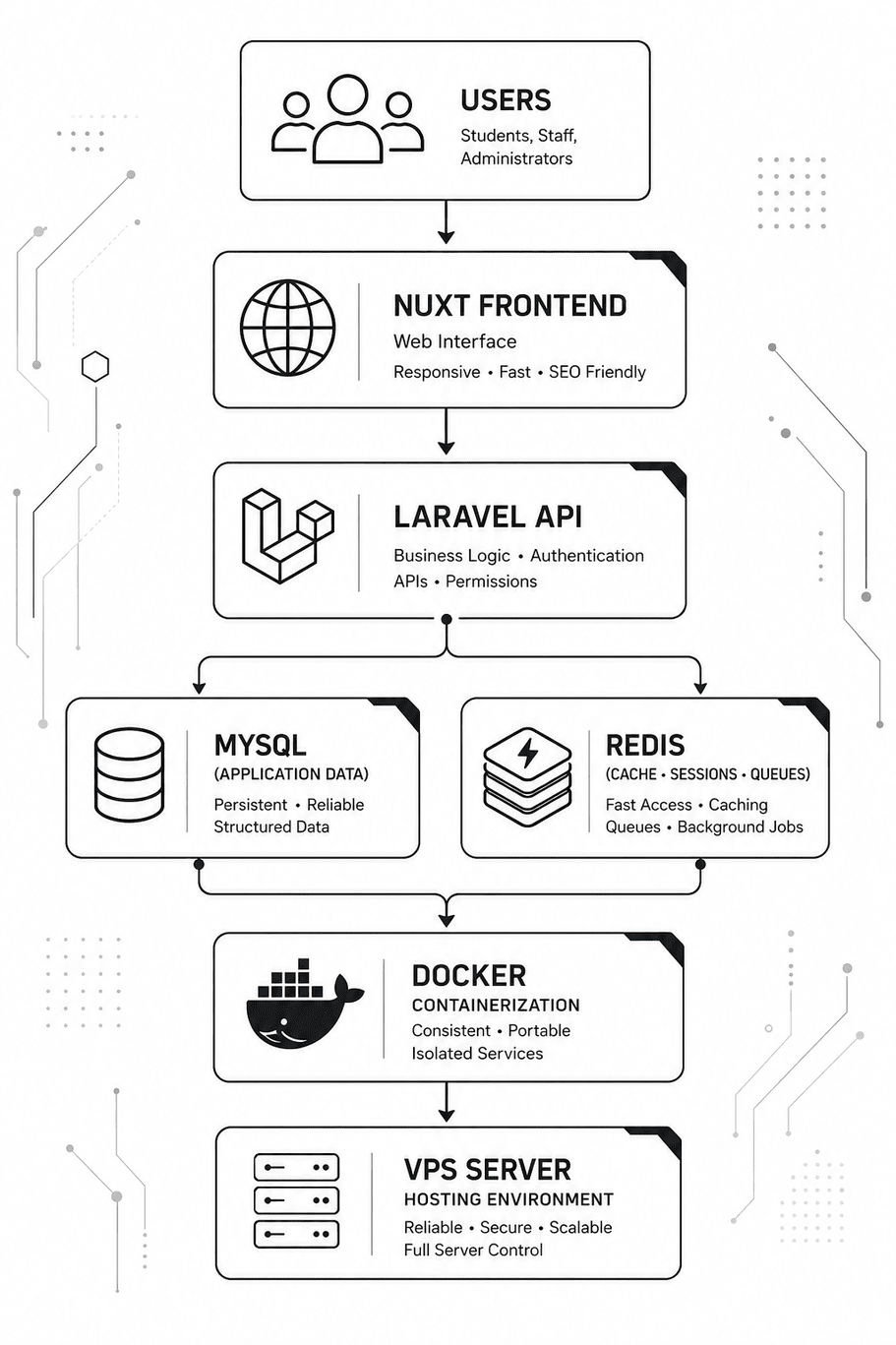
Architecture Insight: A well-designed deployment architecture ensures that every layer of the application—from the user interface to the database—works together efficiently. As your application grows, components such as caching, containerization, monitoring, and cloud infrastructure can be scaled independently without requiring major architectural changes.
Why This Technology Stack Is a Good Fit
The recommended technology stack offers an excellent balance between performance, affordability, maintainability, scalability, and security, making it an ideal choice for a coaching institute or any business management application. Each technology has a specific responsibility, allowing the entire system to remain organized, efficient, and easier to maintain as business requirements evolve.
| Factor | Why This Stack Works |
|---|---|
| Performance | Nuxt delivers a fast and responsive user interface, Laravel efficiently handles business logic, MySQL manages structured data reliably, and Redis improves response times through caching and background processing. |
| Cost | All core technologies—Nuxt, Laravel, MySQL, Redis, and Docker—are open source. The primary ongoing expenses are typically a VPS, domain, backups, and optional third-party services, making the solution affordable for small and growing institutions. |
| Maintainability | Each technology has a clearly defined responsibility: Nuxt for the frontend, Laravel for business logic, MySQL for persistent data, Redis for caching and queues, and Docker for deployment. This separation simplifies development, testing, updates, and long-term maintenance. |
| Scalability | The application can start on a single VPS and grow as demand increases. Additional resources such as load balancers, dedicated database servers, object storage, CDN services, cloud infrastructure, and multi-branch support can be introduced whenever required. |
| Security | Laravel provides built-in authentication, authorization, password hashing, input validation, CSRF protection, and secure API capabilities. Combined with HTTPS, regular updates, automated backups, and proper server configuration, the stack provides a secure foundation for protecting institutional data. |
Final Recommendation: This technology stack is well suited for educational institutions because it delivers an excellent balance of performance, security, scalability, affordability, and ease of maintenance. Organizations can begin with a simple VPS deployment and gradually expand to cloud infrastructure, load balancing, distributed services, and multi-branch support as their business grows—without requiring a complete architectural redesign.
Conclusion
Choosing the right technology stack is one of the most important decisions in software development. It directly influences your application’s performance, security, scalability, development speed, deployment strategy, and long-term maintenance. A well-planned technology stack enables teams to build reliable software today while remaining prepared for future growth.
Throughout this guide, we’ve explored the fundamental components of a modern technology stack, including frontend technologies, backend frameworks, databases, hosting options, cloud platforms, deployment strategies, and real-world technology stack examples. We’ve also discussed practical decision-making frameworks, common mistakes to avoid, and best practices that help development teams select technologies with confidence.
There is no universally “best” technology or framework. The ideal stack depends on your project’s objectives, business requirements, budget, expected traffic, team expertise, scalability goals, and long-term maintenance strategy. Rather than following industry trends, successful development teams choose technologies that solve real business problems efficiently and can evolve alongside the application.
Final Thought: Great software isn’t built by using the newest frameworks or the largest number of tools. It’s built through thoughtful technical decisions, a clear understanding of business requirements, and a technology stack that is secure, maintainable, scalable, and capable of supporting long-term success.