
Introduction
In the previous article, we learned what cloud computing is and why businesses around the world rely on it. However, many beginners still wonder what actually happens when they upload a file, send an email, or open a cloud-based application.
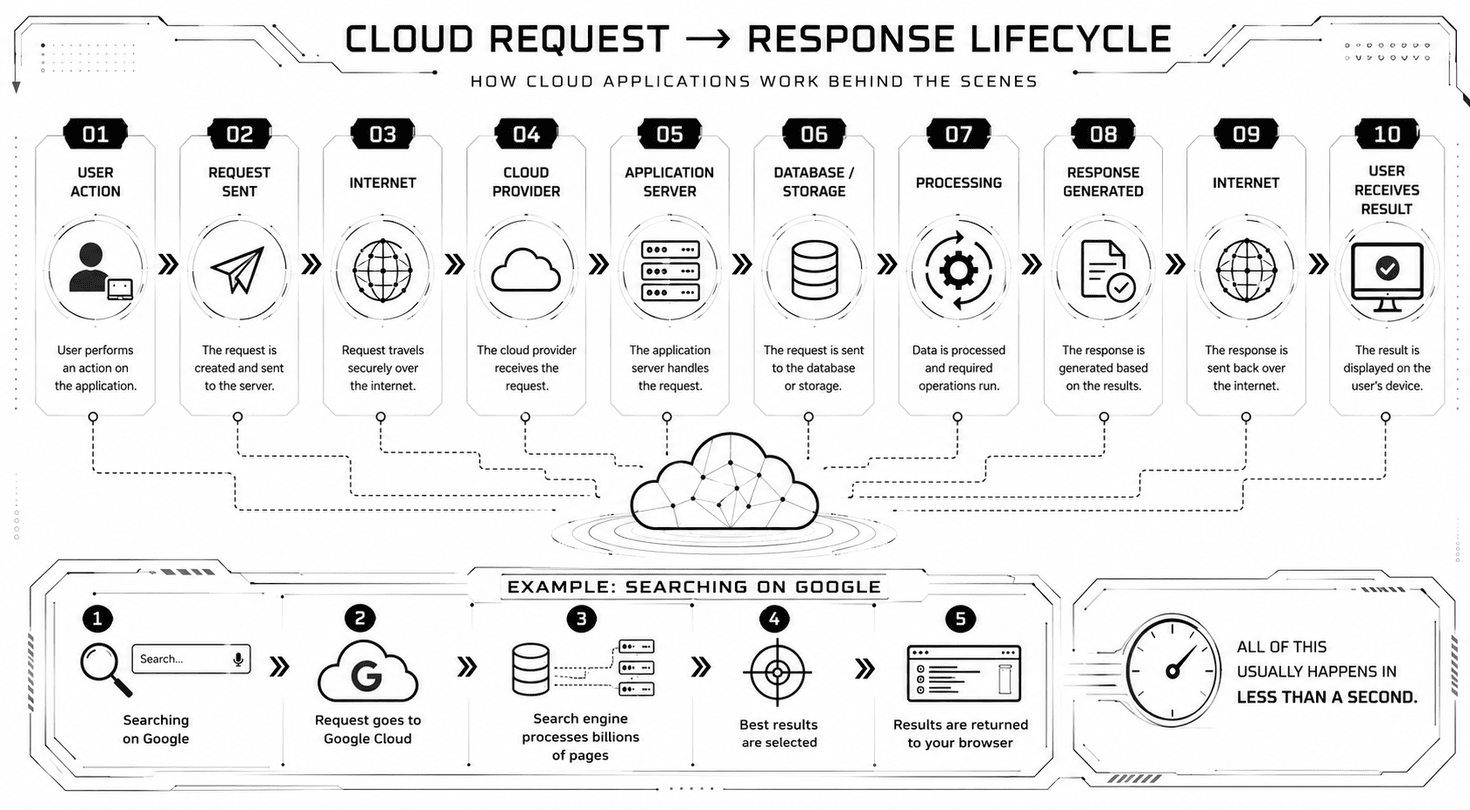
The answer lies in cloud architecture—a combination of users, the internet, cloud providers, data centers, and applications working together in just a few seconds.
In this article, you’ll learn how cloud computing works from the moment a user makes a request until the requested data is returned. By the end, you’ll understand the complete request–response lifecycle using simple examples that anyone can follow.
What is Cloud Architecture?
Cloud architecture is the overall design of a cloud computing system. It defines how different components work together to deliver cloud services over the internet.
A Typical Cloud Architecture Includes

User

Internet

Cloud Provider

Data Centers

Applications & Services
Every time you use a cloud application, these components communicate with each other to process your request and return the result almost instantly.
Components of Cloud Architecture
User
The user is the person accessing a cloud-based application using a desktop computer, laptop, smartphone, or tablet.
Examples include:
Opening Gmail
Uploading a file to Google Drive
Watching Netflix
Shopping on Amazon
Using Microsoft Teams
The user only interacts with the application’s interface. All the complex processing happens behind the scenes.
Internet
The internet acts as the communication bridge between users and cloud services.
Whenever you:
Your request travels securely through the internet to the cloud provider.
Without an internet connection, most cloud services cannot function.
Cloud Provider
A cloud provider owns and manages the infrastructure that powers cloud applications.
Popular cloud providers include:

Amazon Web Services (AWS)

Microsoft Azure

Google Cloud Platform (GCP)
These companies maintain thousands of servers across multiple countries and provide services such as:
Storage
Databases
Networking
AI Services
Security
Backup
Businesses simply rent these services instead of building their own infrastructure.
Data Centers
A data center is a highly secure facility that contains thousands of powerful physical servers.
These facilities include:
Cloud providers operate multiple data centers around the world to ensure:
Fast Performance
Disaster Recovery
Automatic Backups
Data Redundancy
Even if one data center experiences a problem, another can continue serving users.
Applications & Services
The final layer consists of the applications users interact with every day.
Examples include:
These applications use cloud infrastructure to store data, process requests, and deliver responses within seconds.
Real-World Example: Uploading a File to Google Drive
Let’s see how all these components work together.
Select the Photo
You select a photo on your smartphone.
Request Sent
Google Drive sends your upload request through the internet.
Request Received
Google Cloud receives your request.
Account Verification
The cloud identifies your account and verifies that you have permission to upload files.
Secure File Storage
The file is stored securely inside Google’s data centers.
Account Updated
Google updates your account information.
Confirmation Returned
The upload confirmation is sent back to your device.
Available on Every Device
Within seconds, the photo becomes available on your laptop, tablet, and every other device signed into your Google account.
This complete process—from selecting the photo to accessing it on multiple devices—is handled automatically by cloud infrastructure within just a few seconds.
Why This Architecture Matters
This architecture provides several important benefits that make cloud computing reliable, scalable, secure, and efficient for both businesses and users.
Supports Millions of Users
Millions of users can access the same application simultaneously without affecting performance.
High Availability
Applications remain available even if one server or an entire data center fails.
Automatic Scalability
Businesses can automatically increase or decrease computing resources based on demand.
Faster Performance
Users receive faster responses because requests are served from nearby data centers.
Enhanced Security
Data is protected through multiple layers of authentication, encryption, monitoring, and backups.
Continuous Updates
Applications can be updated, maintained, and improved with minimal disruption to users.
Modern websites, mobile applications, streaming platforms, online banking, social media, AI services, and enterprise software all rely on this cloud architecture to deliver fast, secure, and highly available digital experiences to users around the world.
Conclusion
Cloud computing works by connecting users to powerful cloud infrastructure through the internet. Behind every cloud application is a carefully designed architecture consisting of users, networking, cloud providers, data centers, and application services.
Understanding this architecture helps developers appreciate how modern applications achieve scalability, reliability, and high availability. Whether you’re uploading files, streaming videos, shopping online, or accessing business software, the same request–response lifecycle powers nearly every cloud-based service you use.
Key Takeaway
Every cloud application follows the same fundamental process: a user sends a request through the internet, cloud infrastructure processes it using servers and databases, and the response is returned within seconds. This seamless workflow is the foundation of modern cloud computing.
Next in This Series
Now that you understand how cloud computing works, the next step is to explore the Key Characteristics of Cloud Computing, including on-demand self-service, scalability, elasticity, resource pooling, measured service, broad network access, and high availability. These characteristics explain why cloud platforms are flexible, efficient, and widely adopted across modern businesses.