
Introduction
Many beginners believe that software development is all about writing code. This is understandable because most tutorials focus on programming languages, frameworks, and building small applications. However, in professional software development, coding is only one part of a much larger process.
Before developers write a single line of code, they spend time understanding business requirements, planning the project, designing the system, and deciding how different components will work together. After development, the software is tested, deployed, monitored, and continuously improved based on user feedback.
This complete process is known as the Software Development Life Cycle (SDLC). It provides a structured approach to planning, building, testing, deploying, and maintaining software, helping teams deliver reliable, scalable, and high-quality applications.
From applications like WhatsApp and online banking platforms to hospital management systems, every successful software product follows a structured development process.
In this article, we’ll explore each phase of SDLC and understand how real-world software projects are planned and executed from start to finish.
What is SDLC?
The Software Development Life Cycle (SDLC) is a structured process for developing software in a planned and organized manner. Instead of starting with coding, SDLC divides a project into well-defined phases such as requirement gathering, planning, design, development, testing, deployment, and maintenance. This ensures every stage of the project is completed systematically.
Although organizations may follow different models like Agile or Waterfall, the primary goal of SDLC remains the same—to deliver reliable, secure, and high-quality software while reducing risks, delays, and unnecessary costs.
Benefits of Following SDLC
- Better Planning: Clearly defines project scope, timeline, budget, and resources.
- Reduced Risks: Identifies potential issues early, making them easier to resolve.
- Higher Quality: Regular testing and reviews improve software reliability.
- Better Team Collaboration: Clearly defined roles enhance communication and coordination.
- Faster Delivery: A structured workflow reduces rework and keeps projects on schedule.
By following SDLC, development teams stay organized, improve productivity, and build software that meets both business goals and user expectations.
Why SDLC Matters
Every successful software project starts with a clear plan. Without a structured development process, projects can quickly become difficult to manage, especially when multiple developers and stakeholders are involved. The Software Development Life Cycle (SDLC) provides a roadmap that helps teams plan, develop, test, and deliver software efficiently while reducing risks and costly mistakes.
Projects that don’t follow SDLC often face problems such as:
- Confused Requirements – Features may not match business needs.
- Budget Overruns – Frequent changes increase development costs.
- Project Delays – Poor planning leads to missed deadlines.
- Poor Software Quality – Lack of testing results in bugs and security issues.
- Difficult Maintenance – Poorly structured code becomes harder to update and scale.
A Simple Real-World Comparison
Building software without SDLC is like building a house without a blueprint. You may start construction quickly, but changes made later become expensive and time-consuming. Similarly, starting development without proper planning often leads to rework, delays, and unnecessary costs.
By following SDLC, development teams stay organized, reduce uncertainty, and build software that is reliable, scalable, and easier to maintain.
SDLC Phases
Every software project follows a structured sequence of phases, from understanding requirements to maintaining the application after deployment. While organizations may adopt different development models such as Agile or Waterfall, these core phases remain fundamental to building reliable, scalable, and maintainable software.
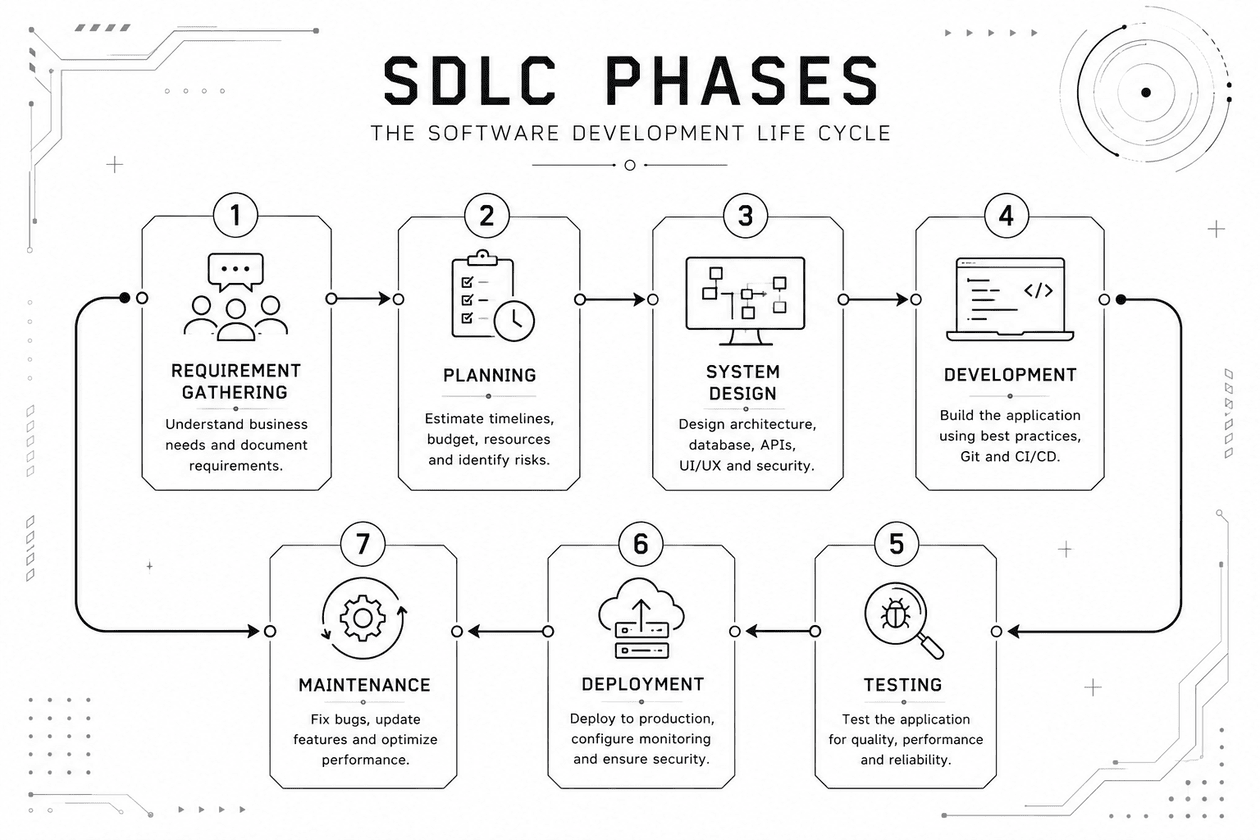
Figure: Software Development Life Cycle (SDLC) Workflow.
| Phase | Objective | Key Deliverable |
|---|---|---|
| Requirement Gathering | Understand business needs, gather functional and non-functional requirements, and define project scope. | Software Requirements Specification (SRS) |
| Planning | Estimate timeline, budget, resources, identify risks, and select the technology stack. | Project Plan |
| System Design | Design the application architecture, database, APIs, UI/UX, and security model (HLD & LLD). | System Design Documents |
| Development | Build the frontend, backend, database, and APIs while following Git, code reviews, and CI/CD practices. | Working Software |
| Testing | Verify functionality through Unit, Integration, System, and User Acceptance Testing (UAT). | Tested & Validated Application |
| Deployment | Release the application to production, configure servers, monitoring, backups, and rollback strategies. | Production Release |
| Maintenance | Fix bugs, improve performance, strengthen security, and introduce new features based on user feedback. | Updated & Optimized Software |
Following these phases helps development teams reduce risks, improve software quality, and deliver applications that are easier to maintain and scale over time.
Case Study: SDLC in a Real Project (LablynQ)
To understand how SDLC works in practice, let’s look at LablynQ, a Laboratory Information Management System (LIMS). Rather than jumping directly into development, the project followed every stage of the Software Development Life Cycle to deliver a reliable and scalable application.
| SDLC Phase | How It Was Applied in LablynQ |
|---|---|
| Requirement Gathering | Discussed laboratory workflows with stakeholders and identified features such as patient registration, test management, report generation, role-based access, and online report delivery. Non-functional requirements included security, performance, backups, and future scalability. |
| System Design | Designed the database, application architecture, APIs, user dashboards, authentication system, and security model before development began. |
| Development | Built the application module by module, including Patient Management, Test Management, Billing, Report Processing, User Management, and the Customer Portal. Git was used for version control and collaboration. |
| Testing | Verified every major feature, including patient registration, report generation, billing, permissions, and overall system functionality. Bugs were identified and resolved before release. |
| Deployment | Deployed the application to the production server, configured the database, backups, environment settings, and monitoring to ensure a stable release. |
| Maintenance | Continued improving the application through bug fixes, security updates, performance optimization, and new features based on customer feedback. |
Key Takeaway
LablynQ demonstrates that successful software is built through a structured process—not by writing code alone. Each SDLC phase contributed to delivering a secure, maintainable, and scalable solution capable of meeting real-world business requirements.
Common SDLC Models
Different organizations choose different SDLC models based on project requirements, team size, budget, and business goals. While the development phases remain similar, the way they are executed varies from one model to another.
| Model | Approach | Advantages | Best For |
|---|---|---|---|
| Waterfall | Sequential; each phase is completed before the next begins. | Simple, well-documented, easy to manage. | Projects with fixed and well-defined requirements. |
| Agile | Iterative development using short sprints and continuous feedback. | Flexible, faster releases, customer-focused. | Modern web, mobile, SaaS, and startup projects. |
| Spiral | Combines development with continuous risk analysis. | Excellent risk management for complex systems. | Large, high-risk, or enterprise applications. |
| V-Model | Every development phase has a corresponding testing phase. | High quality through continuous verification and validation. | Healthcare, banking, automotive, and safety-critical systems. |
Industry Insight: Today, Agile is the most widely adopted SDLC model because it enables teams to deliver software faster, respond to changing requirements, and continuously improve products based on user feedback.
There is no single “best” SDLC model. The right choice depends on the project’s complexity, business objectives, regulatory requirements, and the level of flexibility needed during development.
Which SDLC Model Do Most Companies Use?
Today, Agile is the preferred SDLC model for most software companies. Whether developing web applications, mobile apps, SaaS platforms, or enterprise software, Agile allows teams to release features faster, gather user feedback, and continuously improve the product.
Industry Trend: Agile’s flexibility, rapid delivery, and customer-focused approach have made it the most widely adopted SDLC model across the software industry.
However, no single model is suitable for every project. Organizations choose an SDLC model based on factors such as project complexity, business requirements, regulatory compliance, team structure, and customer expectations. Understanding these models helps developers appreciate why different projects are managed in different ways while still following the same fundamental software development lifecycle.
Common Mistakes Beginners Make
Many beginners focus only on writing code, but professional software development is about following a structured process. Avoiding the following mistakes will help you build better software and develop good engineering habits from the start.
| ❌ Common Mistake | ✅ Better Approach |
|---|---|
| Start coding without understanding the requirements. | Spend time gathering requirements, discussing the problem, and planning the solution first. |
| Ignore documentation. | Maintain basic documentation such as requirements, API notes, and database designs. |
| Skip testing. | Test your application regularly using Unit, Integration, and User Acceptance Testing where appropriate. |
| Don’t use version control. | Use Git to track changes, collaborate with others, and restore previous versions when needed. |
| Don’t take backups. | Regularly back up both your source code and database to prevent data loss. |
| Poor communication. | Communicate clearly with clients, designers, testers, and teammates to avoid misunderstandings and project delays. |
Tip for Beginners: Great software engineers don’t just write good code—they plan carefully, document their work, test thoroughly, collaborate effectively, and continuously improve their applications.
Learn Beyond Coding
Most beginners focus only on programming languages and frameworks. While coding is an essential skill, building successful software also requires planning, documentation, testing, collaboration, and continuous improvement.
Developers who follow the principles of SDLC avoid many common mistakes and become more effective team members. As your projects become larger and more complex, these habits will have a greater impact on your success than simply writing more code.
Successful software engineers don’t just build features—they plan, collaborate, test, document, and continuously improve their software throughout its lifecycle.
SDLC Tools Used in Industry
Modern software development relies on a variety of tools to make each phase of the Software Development Life Cycle more efficient. These tools help teams collaborate, manage projects, write better code, automate testing, and deploy applications reliably.
The choice of tools varies from one organization to another, but the following are among the most commonly used across the software industry.
| SDLC Phase | Popular Tools | Purpose |
|---|---|---|
| Planning & Project Management |
 Jira Jira  Trello Trello  ClickUp ClickUp |
Manage tasks, track progress, assign work, and plan project timelines. |
| Design & Prototyping |
 Figma Figma  Draw.io Draw.io |
Create UI/UX designs, wireframes, flowcharts, and system architecture diagrams. |
| Development |
 Visual Studio Code Visual Studio Code  Visual Studio Visual Studio |
Write, debug, and maintain application source code. |
| Version Control |
 Git Git  GitHub GitHub |
Track code changes, collaborate with team members, and manage source code repositories. |
| Testing |
 Postman Postman  Selenium Selenium |
Test APIs, automate functional testing, and verify application quality. |
| Deployment & Automation |
 Docker Docker  GitHub Actions GitHub Actions |
Package applications, automate builds, testing, and deployment pipelines. |
| Cloud & Hosting |
 AWS AWS  Azure Azure  GCP GCP |
Host applications, databases, storage, and other cloud infrastructure services. |
A Typical Workflow
- The project manager creates tasks and tracks progress using Jira, Trello, or ClickUp.
- UI/UX designers prepare wireframes and application interfaces in Figma.
- Software architects create flowcharts and system diagrams using Draw.io.
- Developers write code in Visual Studio Code or Visual Studio.
- Source code is managed using Git and hosted on platforms like GitHub, allowing multiple developers to collaborate safely.
- APIs are tested with Postman, while automated testing tools like Selenium verify application functionality.
- Docker packages the application into portable containers, and GitHub Actions automates the build, testing, and deployment process.
- Finally, the application is deployed to cloud platforms such as AWS or Microsoft Azure, where it becomes available to users.
It’s important to remember that these are only a few of the many tools available today. New tools continue to emerge, and organizations often choose different combinations based on their technology stack, project requirements, and team preferences. However, understanding these widely used tools gives beginners a solid foundation for working in professional software development environments.
SDLC Best Practices
Following SDLC is not enough—successful software projects also rely on good engineering practices. Whether you’re building a personal project or an enterprise application, these habits will help you develop better software.
| ✔ Best Practice | Why It Matters |
|---|---|
| Understand requirements first | Prevents misunderstandings and reduces costly rework. |
| Write clean code | Makes the application easier to maintain, debug, and extend. |
| Review code regularly | Improves code quality and helps catch issues early. |
| Test continuously | Detects bugs before they reach production. |
| Document important decisions | Makes collaboration and future maintenance much easier. |
| Use Git effectively | Tracks code changes and enables safe team collaboration. |
| Monitor production | Helps identify performance issues and system failures early. |
| Learn from user feedback | Drives continuous improvement and better user experiences. |
Remember: Successful software isn’t built by coding alone. Planning, collaboration, testing, documentation, and continuous improvement are what transform a good application into a reliable product.
Build Software as a Process, Not Just a Product
Professional software development is much more than writing functional code. Successful teams focus on understanding the problem, planning carefully, maintaining high coding standards, testing thoroughly, and continuously improving the application after deployment.
By following these best practices alongside the Software Development Life Cycle, developers can build software that is reliable, scalable, maintainable, and capable of meeting real-world business needs.
Final Takeaway: Great software is not created by writing code alone. It is the result of a disciplined process that combines planning, collaboration, quality assurance, continuous learning, and improvement throughout the entire software development lifecycle.
Conclusion
Software development is much more than writing code. Every successful application follows a structured process—from gathering requirements and designing the system to development, testing, deployment, and maintenance. This is what the Software Development Life Cycle (SDLC) is all about.
Whether you’re building a personal project or an enterprise application like LablynQ, following SDLC helps you deliver software that is reliable, scalable, secure, and easier to maintain.
As a beginner, don’t focus only on programming. Practice planning, documenting, testing, using Git, and collaborating with others. These habits will prepare you for real-world software development, where solving problems through a well-defined process is just as important as writing quality code.
Key Takeaway: Great software is built through a structured process, not just by writing code. Mastering SDLC principles will help you create reliable applications and become a more effective software developer.